

fbpx
Red Maple leaf
BLOG

Repay

Pay Your Loan the Easy Way

with Maple Federal Credit Union

Making your Maple loan payment is quick and easy. With our secure online payment portal, you can make a payment when it works best for you – whether you’re at home or on the go.

You can make a payment using Visa debit card, Mastercard debit card, or Discover debit card, or through ACH (Automated Clearing House), which allows you to securely transfer funds directly from your bank account.

This convenient option gives you a fast and flexible way to stay on track with your loan payments.

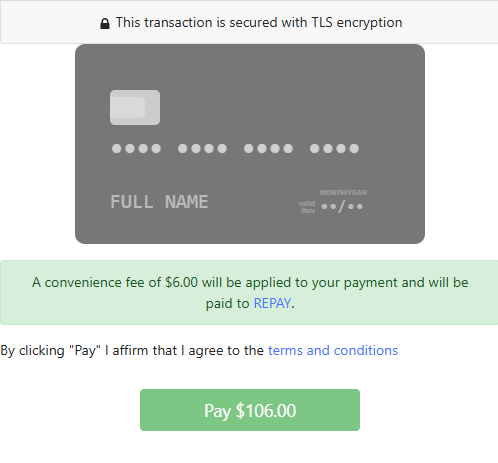
You’ll be directed to Maple’s secure payment portal hosted by REPAY to complete your transaction. You may also access this link when logged into Maple FCU Online Banking. There is a $6 fee per payment when using this service.

Questions? We’re happy to help—please contact us if you need assistance.

Step-by-Step

How to Make a Loan Payment Online

Step 1: Login to Instant Maple and Get Started!  

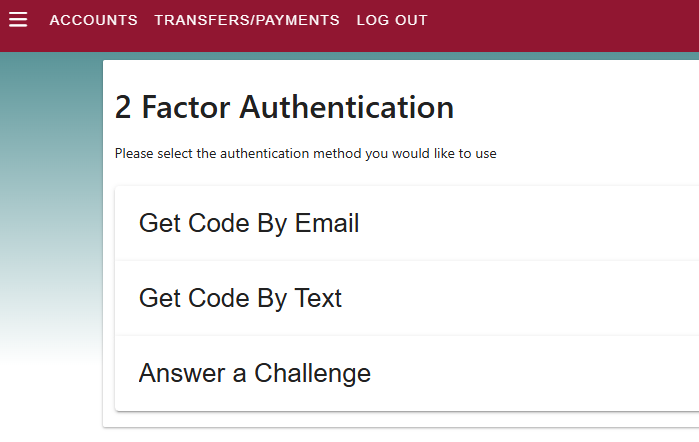
After selecting Transfers/Payments, you may be asked to complete Two-Factor Authentication for security.

Choose how you would like to receive your verification code:
  • Get Code by Email
  • Get Code by Text Message
  • Answer a Security Challenge

Once verified, you will be able to continue to the payment screen.

Step 2: Select Where the Payment Is Coming From

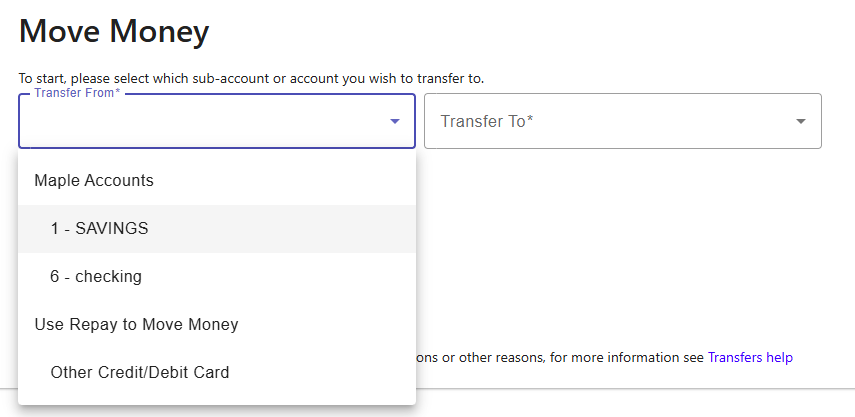
On the Move Money screen, choose:

Transfer From:

Select the account you want to pay from. Options may include:
  • Your Maple Savings
  • Your Maple Checking
  • Other Debit Card (via REPAY)

Transfer To:

Select the loan you want to make a payment toward.
Then click Continue.

Step 3: Enter Your Payment Details

If paying with a debit card, you will be directed to Maple’s secure payment portal powered by REPAY. Enter:

  • Payment Amount
  • Email Address
  • Billing Address
  • Cardholder Name
  • Card Number
  • Security Code
  • Expiration Date

As you enter your card information, the card image will automatically populate.
 

Step 4: Review Authorization

Before completing your payment, you will review the Payment Authorization to confirm payment amount, loan to receive payment and the convenience fee. 

Payments are processed securely. 

Step 5: Sign and Submit Your Payment

To complete your payment:
  1. Review the payment authorization
  2. Electronically authorize the payment
  3. Click the Pay button

Your payment will be processed immediately.
Red Maple leaf
Red Maple leaf

You are now leaving Maple Federal Credit Union

Maple Federal Credit Union provides links to web sites of other organizations in order to provide visitors with certain information. A link does not constitute an endorsement of content, viewpoint, policies, products or services of that web site. Once you link to another web site not maintained by Maple Federal Credit Union, you are subject to the terms and conditions of that web site, including but not limited to its privacy policy.

You will be redirected to

Click the link above to continue or CANCEL